Backing up your Tumblr blog to WordPress

quickguide:

In this tutorial we’ll teach you how to make a copy of your Tumblr blog onto WordPress.com to act as a backup.

The first two steps don’t need to be followed if you already use WordPress.com.

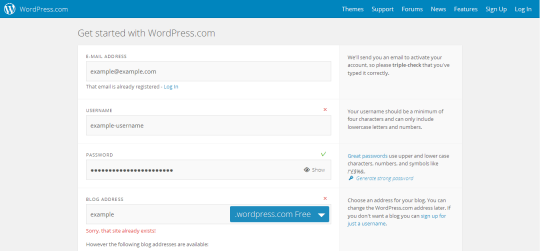
1. Sign up for a WordPress.com account

You need a WordPress.com blog, simply follow the steps to select your username and confirm your account via email.

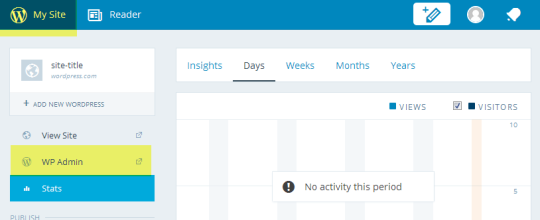
2. Open WordPress Admin

  • Click on My Site
  • Select the WP Admin you wish to import into

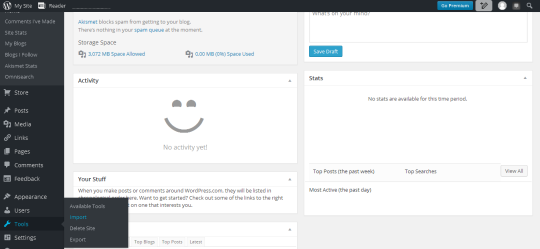
3. Visit the import tools page

In the sidebar menu select ‘tools’ and then ‘import’.

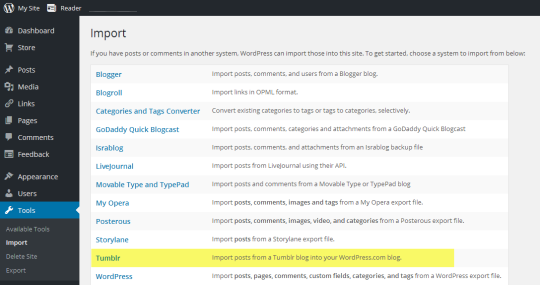
4. Select import from Tumblr

5. Allow Tumblr access

image

Click the ‘Connect to Tumblr to begin’ button. You may need to log into Tumblr if you haven’t already. Be sure to allow access to WordPress.com

6. Start the import!

Once authenticated you can select your Tumblr blog from the list of your blogs and click on ‘Import this blog’.

And you’re done, WordPress.com takes care of the rest and will create a copy of your posts onto your WordPress.com blog.

geekydoesart:

aw shit two in one night!!! its chagirl aubrey little 🙂

[id: an animation of Aubrey Little from the chest up. She is a medium complexioned woman with her black hair shaved on the sides and dyed red on top. She is wearing a dark grey jacket with several pins on it, including a pin with the bisexual flag on it and one with the transgender flag. She is wearing black sunglasses that the light glints off it, and as it shines over her eyes we see that one of her eyes is brown and the other is bright orange.]